Network Communication at a high level
Network communication, Layers
OSI (Open Systems Interconnection)
| Layer | Transport mechanism | Device | Protocols | |
|---|---|---|---|---|
7 |
Application | SSH, HTTP, HTTPS |
||
6 |
Presentation | |||
5 |
Session | |||
4 |
Transport | Segments | TCP, UDP |
|
3 |
Network | Packets | Router | IP, ICMP |
2 |
Datalink | Frames | Switch | Ethernet, ARP |
1 |
Physical | Bits | Hub |
Physical layer
- Actual medium of data transfer.
- Copper cables (uses Electric signals); Optical Fiber cables (uses Light); Wireless (Uses Radio Frequency)
- Hubs are Layer 1 devices. They’re nothing more than a Repeater. A Hub does not have any intelligence, It simply forwards the traffic it receives across all the connected devices.
Datalink layer
- Switch is Layer 2 device. It can understand Data Link Frames. A switch maintains MAC addresses and the ports of all devices connected to it.
- Each Frame encapsulates the upper layer data unit, which is IP Packet.
- Every frame also has the source and destination MAC addresses. These are used to route frames in the same network.
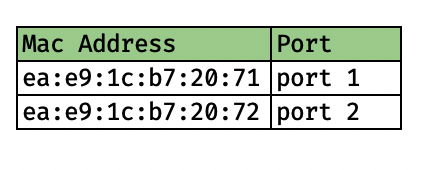
Network layer
- Router is Layer 3 device. It can understand IP packets. It is used to forward IP packets from one network to another. It maintains a route table that tells the next destination for the IP packet to which the packet needs to be routed.
- Each packet encapsulates the upper layer data unit. It could be a TCP Segment or UDP Datagram.
- A packet also has source and destination IP addresses. The IP addresses belong to the network or different networks.
Transport layer
Application layer
IP addresses
Class A |
0.0.0.0 to 127.255.255.255 |
128 Networks (From 0 to 127). Default netmask /8. Each network with 2 power 24 IP addresses. |
Class B |
128.0.0.0 to 191.255.255.255 |
Network - 128.0 to 191.255. Default netmask /16. Each network with 2 power 16 hosts. |
Class C |
192.0.0.0 to 223.255.255.255 |
Network - 192.0.0 to 223.255.255. Default netmask /24. Each network with 254 hosts. |
Class D |
Used for Multicast | |
Class E |
Reserved |
Private IPv4 Address Space
10.0.0.0to10.255.255.255- 1 Class A network
172.16.0.0to172.31.255.255- 16 Class B networks
192.168.0.0to192.168.255.255- 255 Class C networks
Note that, for a given IP range for a network, if we use Default subnet mask /8 or /16 or / 24, it is called Classful network. Otherwise it is called Classless network. For example, networks starting with 10.X.X.X are Class A networks. If we use 10.0.0.0/8 it is called Classful network as /8 is the default mask for Class A. However, if we use 10.0.0.0/16 where network is 10.16.0.0 it is called Classless network as we are using /16.
Subnetting
Let’s say I have a network 10.0.0.0/24.
/24means, out of32bits of the IP address, first24bits do not change for each host in this network. For each host, first24bits are the same. Another way to represent this is using a Subnet mask .255.255.255.0is the subnet mask to represent/24.- This means that the network ID is
10.0.0.0and the network can have255addresses (With24bits taken by Network ID, we are left with8bits. With8bits, we can have maximum255unique values). But, the last IP is used for broadcasting.10.0.0.0is the network ID. It cannot be used to assign to a host.10.0.0.255is the Broadcast IP. It cannot be used either to assign to a host.
- At this point, we have
254addresses that can be assigned to devices in the network.
How to split this network into 4 sub networks?
- To identify each subnet, we need subnet ID. However, the first
24 bitsare already taken by the original network. so, we have to borrow bits from the host bits to create new subnets. For 4 subnets, we need2 bits. So, out of8 bits,2 bitswill be used for Subnet ID, and6 bitswill be used for Hosts in the subnet.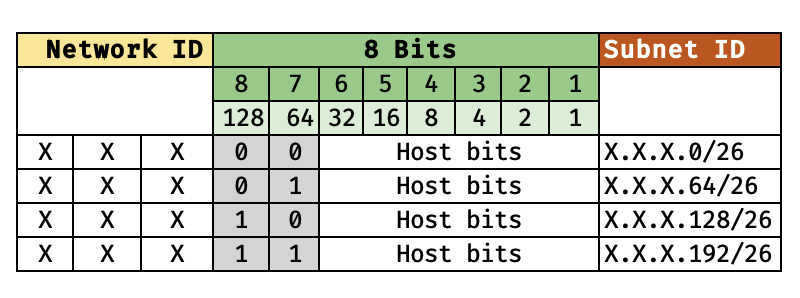
- The Network IDs would now be
/26rather than/24.
The four subnets look like this:
10.0.0.0 |
10.0.0.64 |
10.0.0.128 |
10.0.0.192 |
|---|---|---|---|
10.0.0.1 |
10.0.0.65 |
10.0.0.129 |
10.0.0.193 |
10.0.0.2 |
10.0.0.66 |
10.0.0.130 |
10.0.0.194 |
10.0.0.3 |
10.0.0.67 |
10.0.0.131 |
10.0.0.195 |
10.0.0.4 |
10.0.0.68 |
10.0.0.132 |
10.0.0.196 |
10.0.0.5 |
10.0.0.69 |
10.0.0.133 |
10.0.0.197 |
10.0.0.6 |
10.0.0.70 |
10.0.0.134 |
10.0.0.198 |
10.0.0.7 |
10.0.0.71 |
10.0.0.135 |
10.0.0.199 |
10.0.0.8 |
10.0.0.72 |
10.0.0.136 |
10.0.0.200 |
10.0.0.9 |
10.0.0.73 |
10.0.0.137 |
10.0.0.201 |
10.0.0.10 |
10.0.0.74 |
10.0.0.138 |
10.0.0.202 |
10.0.0.11 |
10.0.0.75 |
10.0.0.139 |
10.0.0.203 |
10.0.0.12 |
10.0.0.76 |
10.0.0.140 |
10.0.0.204 |
10.0.0.13 |
10.0.0.77 |
10.0.0.141 |
10.0.0.205 |
10.0.0.14 |
10.0.0.78 |
10.0.0.142 |
10.0.0.206 |
10.0.0.15 |
10.0.0.79 |
10.0.0.143 |
10.0.0.207 |
10.0.0.16 |
10.0.0.80 |
10.0.0.144 |
10.0.0.208 |
10.0.0.17 |
10.0.0.81 |
10.0.0.145 |
10.0.0.209 |
10.0.0.18 |
10.0.0.82 |
10.0.0.146 |
10.0.0.210 |
10.0.0.19 |
10.0.0.83 |
10.0.0.147 |
10.0.0.211 |
10.0.0.20 |
10.0.0.84 |
10.0.0.148 |
10.0.0.212 |
10.0.0.21 |
10.0.0.85 |
10.0.0.149 |
10.0.0.213 |
10.0.0.22 |
10.0.0.86 |
10.0.0.150 |
10.0.0.214 |
10.0.0.23 |
10.0.0.87 |
10.0.0.151 |
10.0.0.215 |
10.0.0.24 |
10.0.0.88 |
10.0.0.152 |
10.0.0.216 |
10.0.0.25 |
10.0.0.89 |
10.0.0.153 |
10.0.0.217 |
10.0.0.26 |
10.0.0.90 |
10.0.0.154 |
10.0.0.218 |
10.0.0.27 |
10.0.0.91 |
10.0.0.155 |
10.0.0.219 |
10.0.0.28 |
10.0.0.92 |
10.0.0.156 |
10.0.0.220 |
10.0.0.29 |
10.0.0.93 |
10.0.0.157 |
10.0.0.221 |
10.0.0.30 |
10.0.0.94 |
10.0.0.158 |
10.0.0.222 |
10.0.0.31 |
10.0.0.95 |
10.0.0.159 |
10.0.0.223 |
10.0.0.32 |
10.0.0.96 |
10.0.0.160 |
10.0.0.224 |
10.0.0.33 |
10.0.0.97 |
10.0.0.161 |
10.0.0.225 |
10.0.0.34 |
10.0.0.98 |
10.0.0.162 |
10.0.0.226 |
10.0.0.35 |
10.0.0.99 |
10.0.0.163 |
10.0.0.227 |
10.0.0.36 |
10.0.0.100 |
10.0.0.164 |
10.0.0.228 |
10.0.0.37 |
10.0.0.101 |
10.0.0.165 |
10.0.0.229 |
10.0.0.38 |
10.0.0.102 |
10.0.0.166 |
10.0.0.230 |
10.0.0.39 |
10.0.0.103 |
10.0.0.167 |
10.0.0.231 |
10.0.0.40 |
10.0.0.104 |
10.0.0.168 |
10.0.0.232 |
10.0.0.41 |
10.0.0.105 |
10.0.0.169 |
10.0.0.233 |
10.0.0.42 |
10.0.0.106 |
10.0.0.170 |
10.0.0.234 |
10.0.0.43 |
10.0.0.107 |
10.0.0.171 |
10.0.0.235 |
10.0.0.44 |
10.0.0.108 |
10.0.0.172 |
10.0.0.236 |
10.0.0.45 |
10.0.0.109 |
10.0.0.173 |
10.0.0.237 |
10.0.0.46 |
10.0.0.110 |
10.0.0.174 |
10.0.0.238 |
10.0.0.47 |
10.0.0.111 |
10.0.0.175 |
10.0.0.239 |
10.0.0.48 |
10.0.0.112 |
10.0.0.176 |
10.0.0.240 |
10.0.0.49 |
10.0.0.113 |
10.0.0.177 |
10.0.0.241 |
10.0.0.50 |
10.0.0.114 |
10.0.0.178 |
10.0.0.242 |
10.0.0.51 |
10.0.0.115 |
10.0.0.179 |
10.0.0.243 |
10.0.0.52 |
10.0.0.116 |
10.0.0.180 |
10.0.0.244 |
10.0.0.53 |
10.0.0.117 |
10.0.0.181 |
10.0.0.245 |
10.0.0.54 |
10.0.0.118 |
10.0.0.182 |
10.0.0.246 |
10.0.0.55 |
10.0.0.119 |
10.0.0.183 |
10.0.0.247 |
10.0.0.56 |
10.0.0.120 |
10.0.0.184 |
10.0.0.248 |
10.0.0.57 |
10.0.0.121 |
10.0.0.185 |
10.0.0.249 |
10.0.0.58 |
10.0.0.122 |
10.0.0.186 |
10.0.0.250 |
10.0.0.59 |
10.0.0.123 |
10.0.0.187 |
10.0.0.251 |
10.0.0.60 |
10.0.0.124 |
10.0.0.188 |
10.0.0.252 |
10.0.0.61 |
10.0.0.125 |
10.0.0.189 |
10.0.0.253 |
10.0.0.62 |
10.0.0.126 |
10.0.0.190 |
10.0.0.254 |
10.0.0.63 |
10.0.0.127 |
10.0.0.191 |
10.0.0.255 |
- The last IP address is each subnet is called Brocdcast IP address. here,
10.0.0.63/26,10.0.0.127/26,10.0.0.191/26,10.0.0.255/26are the broadcast IP address respectively.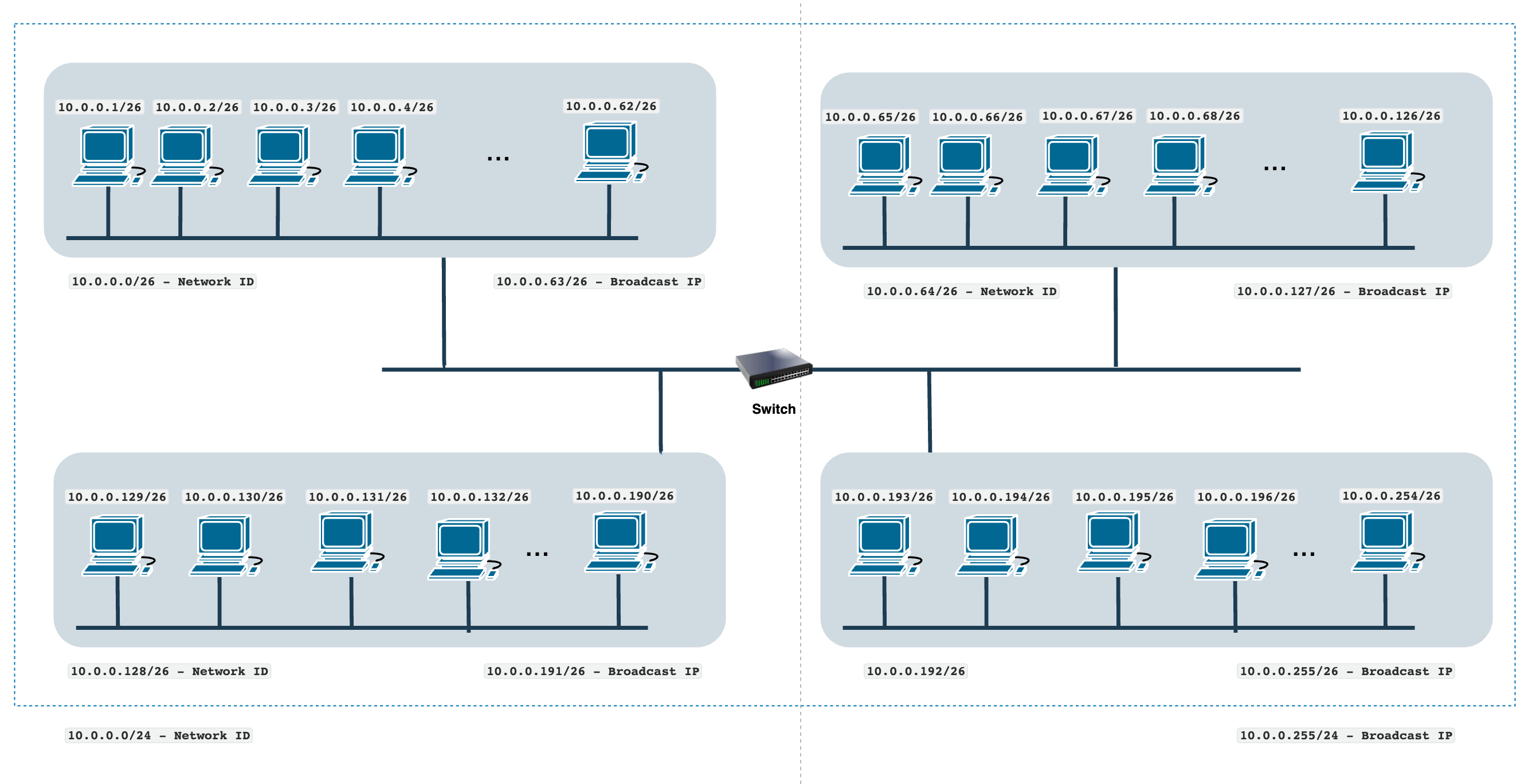
How two devices in the same network communicate?
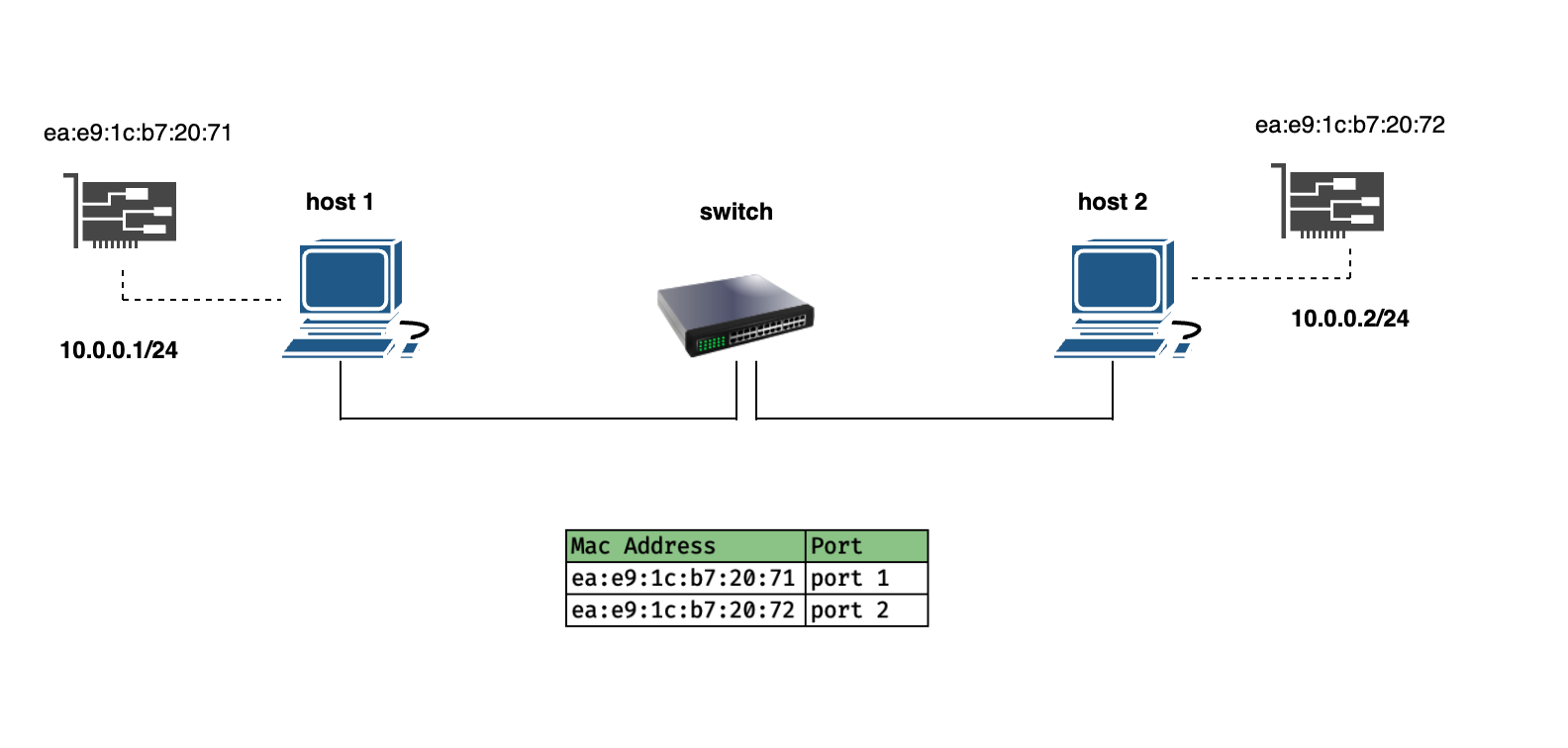
host 2is running a web server on port80.- A user on
host 1opened a web browser and typedhttp://10.0.0.2. Web browser falls under Application layer.- The transport layer creates a segment with a random port (say
12567as the source port and80as the target port) - The network layer creates a packet by encapsulating the segment. The packet has source IP as
10.0.0.1and destination IP as10.0.0.2 - The Datalink layer takes the packet and creates a Frame. However, It does not know the MAC address of the target machine. Here,
host 1needs to identify whetherhost 2is on the same network or different network. If on the same network, traffic does not have to leave the network. In this case, as both are on same network,host 1realizes that it needs the MAC address ofhost 2.
- The transport layer creates a segment with a random port (say
host 1creates a Broadcast frame with Destination MAC address as10.0.0.255. When the switch sees the broadcast address, it broadcasts the frame to all hosts in the network.host 2responds with its MAC address which is then received byhost 1. This is Address Resolution Protocol.host 1creates a Frame by encapsulating the packet with source MAC asea:e9:1c:b7:20:71and target MAC address asea:e9:1c:b7:20:72and forwards it to the switch.- The switch knows the MAC addresses and the ports of each device connected to it using the MAC address table. It identifies that
host 2is the target and forwards it.