Networking - Troubleshooting
Linux network troubleshooting commands
Overview
This post shows some commonly used Linux network troubleshooting commands.
netstat
netstatprints information about the Linux networking subsystem.
➜ netstat -tulpn | grep LISTEN
-t- TCP-u- UDP-l- Show only listening sockets.-p- Show the PID and name of the program to which each socket belongs.-n- Show numerical addresses instead of trying to determine symbolic host, port or user names.
tcp        0      0 127.0.0.53:53           0.0.0.0:*               LISTEN      497/systemd-resolve
tcp        0      0 127.0.0.1:631           0.0.0.0:*               LISTEN      655/cupsd
tcp6       0      0 ::1:631                 :::*                    LISTEN      655/cupsd
ss
- Socket Statistics
- Used to dump socket statistics. It allows showing information similar to netstat. It can display more TCP and state information than other tools.
➜ ss -lptn | grep 4040
dig
dig is a flexible tool for interrogating DNS name servers. It performs DNS lookups and displays the answers that are returned from the name server(s) that were queried. Most DNS administrators use dig to troubleshoot DNS problems because of its flexibility, ease of use and clarity of output. Other lookup tools tend to have less functionality than dig.
➜ dig ryandam.net
A- represents IPv4 address.- The IP addresses are the servers where the web site is hosted.
; <<>> DiG 9.16.1-Ubuntu <<>> ryandam.net
;; global options: +cmd
;; Got answer:
;; ->>HEADER<<- opcode: QUERY, status: NOERROR, id: 26268
;; flags: qr rd ra; QUERY: 1, ANSWER: 4, AUTHORITY: 0, ADDITIONAL: 1

;; OPT PSEUDOSECTION:
; EDNS: version: 0, flags:; udp: 65494
;; QUESTION SECTION:
;ryandam.net.			IN	A

;; ANSWER SECTION:
ryandam.net.		60	IN	A	13.226.234.73
ryandam.net.		60	IN	A	13.226.234.33
ryandam.net.		60	IN	A	13.226.234.58
ryandam.net.		60	IN	A	13.226.234.41

;; Query time: 80 msec
;; SERVER: 127.0.0.53#53(127.0.0.53)
;; WHEN: Sat Jan 30 14:33:52 AEDT 2021
;; MSG SIZE  rcvd: 104
The ping command proves that the site is indeed hosted on the servers reported before.
➜ ping ryandam.net
PING ryandam.net (13.226.234.58) 56(84) bytes of data.
64 bytes from server-13-226-234-58.lax50.r.cloudfront.net (13.226.234.58): icmp_seq=1 ttl=228 time=199 ms
64 bytes from server-13-226-234-58.lax50.r.cloudfront.net (13.226.234.58): icmp_seq=2 ttl=228 time=200 ms
64 bytes from server-13-226-234-58.lax50.r.cloudfront.net (13.226.234.58): icmp_seq=3 ttl=228 time=199 ms
64 bytes from server-13-226-234-58.lax50.r.cloudfront.net (13.226.234.58): icmp_seq=4 ttl=228 time=198 ms
64 bytes from server-13-226-234-58.lax50.r.cloudfront.net (13.226.234.58): icmp_seq=5 ttl=228 time=201 ms
➜ ping ryandam.net
PING ryandam.net (13.226.234.33) 56(84) bytes of data.
64 bytes from server-13-226-234-33.lax50.r.cloudfront.net (13.226.234.33): icmp_seq=1 ttl=231 time=191 ms
64 bytes from server-13-226-234-33.lax50.r.cloudfront.net (13.226.234.33): icmp_seq=2 ttl=231 time=192 ms
64 bytes from server-13-226-234-33.lax50.r.cloudfront.net (13.226.234.33): icmp_seq=3 ttl=231 time=193 ms
64 bytes from server-13-226-234-33.lax50.r.cloudfront.net (13.226.234.33): icmp_seq=4 ttl=231 time=192 ms
^C
Get the name servers list
- My web site is hosted on S3 and deployed using CloudFront. I assigned a custom domain name
ryandam.net. - The name servers are where the hosted zone is stored. These are authoritative name servers.
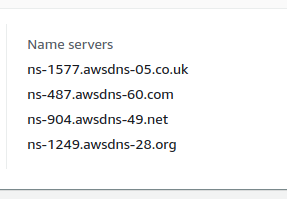
Use the following command to find the name servers
➜ dig ryandam.net NS +noall +answer
ryandam.net.		44	IN	NS	ns-1577.awsdns-05.co.uk.
ryandam.net.		44	IN	NS	ns-487.awsdns-60.com.
ryandam.net.		44	IN	NS	ns-904.awsdns-49.net.
ryandam.net.		44	IN	NS	ns-1249.awsdns-28.org.
Fetch the TXT record
TXTrecords are a type of Domain Name System (DNS) record that contains text information for sources outside of a domain. In Route 53, a TXT record can be added.- The TXT records are used for various purposes. Google uses them to verify domain ownership and to ensure email security. For example, when using Google Search Console to verify ownership, Google generates a TXT record which should then be added to the DNS Hosted zone.
➜ dig ryandam.net TXT +noall +answer
Show Hosted zone record sets
➜ dig ryandam.net ANY +noall +answer
; <<>> DiG 9.10.6 <<>> ryandam.net ANY +noall +answer
;; global options: +cmd
ryandam.net.		60	IN	A	13.226.234.41
ryandam.net.		60	IN	A	13.226.234.33
ryandam.net.		60	IN	A	13.226.234.58
ryandam.net.		60	IN	A	13.226.234.73
ryandam.net.		60	IN	NS	ns-1249.awsdns-28.org.
ryandam.net.		60	IN	NS	ns-1577.awsdns-05.co.uk.
ryandam.net.		60	IN	NS	ns-487.awsdns-60.com.
ryandam.net.		60	IN	NS	ns-904.awsdns-49.net.
ryandam.net.		900	IN	SOA	ns-1577.awsdns-05.co.uk. awsdns-hostmaster.amazon.com. 1 7200 900 1209600 86400
ryandam.net.		60	IN	TXT	"google-site-verification=UXk2BWBOUTJU30g1-eirpalfOHA9xwYIMrwEca30fm4"
A- IPv4 address recordNS- Name serverSOA- Start Of Authority; contains administrative detailsTXT- TXT record
Print Name servers & web servers
➜ dig @ns-487.awsdns-60.com ryandam.net
Trace
➜ dig ryandam.net +trace
; <<>> DiG 9.16.1-Ubuntu <<>> ryandam.net +trace
;; global options: +cmd
.			469089	IN	NS	i.root-servers.net.
.			469089	IN	NS	j.root-servers.net.
.			469089	IN	NS	k.root-servers.net.
.			469089	IN	NS	l.root-servers.net.
.			469089	IN	NS	m.root-servers.net.
.			469089	IN	NS	b.root-servers.net.
.			469089	IN	NS	c.root-servers.net.
.			469089	IN	NS	d.root-servers.net.
.			469089	IN	NS	e.root-servers.net.
.			469089	IN	NS	f.root-servers.net.
.			469089	IN	NS	g.root-servers.net.
.			469089	IN	NS	h.root-servers.net.
.			469089	IN	NS	a.root-servers.net.
;; Received 262 bytes from 127.0.0.53#53(127.0.0.53) in 15 ms

net.			172800	IN	NS	g.gtld-servers.net.
net.			172800	IN	NS	b.gtld-servers.net.
net.			172800	IN	NS	e.gtld-servers.net.
net.			172800	IN	NS	h.gtld-servers.net.
net.			172800	IN	NS	k.gtld-servers.net.
net.			172800	IN	NS	d.gtld-servers.net.
net.			172800	IN	NS	a.gtld-servers.net.
net.			172800	IN	NS	j.gtld-servers.net.
net.			172800	IN	NS	f.gtld-servers.net.
net.			172800	IN	NS	m.gtld-servers.net.
net.			172800	IN	NS	i.gtld-servers.net.
net.			172800	IN	NS	c.gtld-servers.net.
net.			172800	IN	NS	l.gtld-servers.net.
net.			86400	IN	DS	35886 8 2 7862B27F5F516EBE19680444D4CE5E762981931842C465F00236401D 8BD973EE
net.			86400	IN	RRSIG	DS 8 1 86400 20210211200000 20210129190000 42351 . bbBIKRuKijvkgXW9YwR9R1mHgEOmOo0dc/QG79XO2tHjqSae+uEp0OkR M/6tDR4dRRMXcJq9ev+/lDvPJnYEjK1xmKVFuUnfqQcfh2jadXAGO/W6 gi236UYDni4yTaK3uTdbhefWzpXWkVsXA1cycTQIUF7Id3fPkKeQnrMs SIqWvNNaS93MYkdLxfGWvjMo5EN1Tf1h27psLcRnJA6X1jZTi2xw9aE6 MrStOuXkscmR1WUtTzg1YJSAbnv7Uxgd26W4gJmcTFoGToUONjzY/YXD kln4NzITBcYo0ST/bhcNro9WnzHNDY0DKi/h6y8scAPkBmrSJskIiiL2 cnTHNA==
;; Received 1168 bytes from 202.12.27.33#53(m.root-servers.net) in 219 ms

ryandam.net.		172800	IN	NS	ns-487.awsdns-60.com.
ryandam.net.		172800	IN	NS	ns-904.awsdns-49.net.
ryandam.net.		172800	IN	NS	ns-1577.awsdns-05.co.uk.
ryandam.net.		172800	IN	NS	ns-1249.awsdns-28.org.
A1RT98BS5QGC9NFI51S9HCI47ULJG6JH.net. 86400 IN NSEC3 1 1 0 - A1RUUFFJKCT2Q54P78F8EJGJ8JBK7I8B NS SOA RRSIG DNSKEY NSEC3PARAM
A1RT98BS5QGC9NFI51S9HCI47ULJG6JH.net. 86400 IN RRSIG NSEC3 8 2 86400 20210205084503 20210129073503 30944 net. QgEKoWV+MRQE7+jiZ8jbAAmtATHCMUY9nsGg1xBJi79E9zHQ1y5r9wFf uFMxUzovULJhXnrxg58rsVem90T0A+xIOhpZk+G9jXuPgV3S9Oa39hIB b9m23guKYJFIWs+ZJn6hwyNjY8d1qmNwEoR0mNN5+PI1/PS85vl32oJn HCPnz/1yV+0Hw/yVqm3PQkoCeLJlMzLaksDnBY5kU3Gy0A==
MAB6G0O2D2J1I1J6SKB85ED6CPQ64T4T.net. 86400 IN NSEC3 1 1 0 - MAB7UJHVQI0KO3KBAJ3HQIBC1CC9P9DU NS DS RRSIG
MAB6G0O2D2J1I1J6SKB85ED6CPQ64T4T.net. 86400 IN RRSIG NSEC3 8 2 86400 20210203083445 20210127072445 30944 net. ZGs0HjwKC65r/2gA/RMI9yHZ/TdvuE0zPioZW0M18T1EggjrBpH4tbFt kxtbSJcYx7Jtd2T5IEBcV9K7MBkjHucPrCCjpl0gRmyRsg3HkyOnKffO TpU9tNKScNMfr1X//8mjKaVN7bDZSTekElRkGRoKgzX4RgounNelfONE /+4PHL6RsopoycQ9MnN+RGws8e8Ve3hZkb5P8QsHBjp9WA==
;; Received 742 bytes from 192.55.83.30#53(m.gtld-servers.net) in 139 ms
DS- Delegation Signer.RRSIG- Resource Record SignatureNSEC- Next Secure Record. Contains a link to the next record name in the zone and lists the record types that exist for the record’s name.
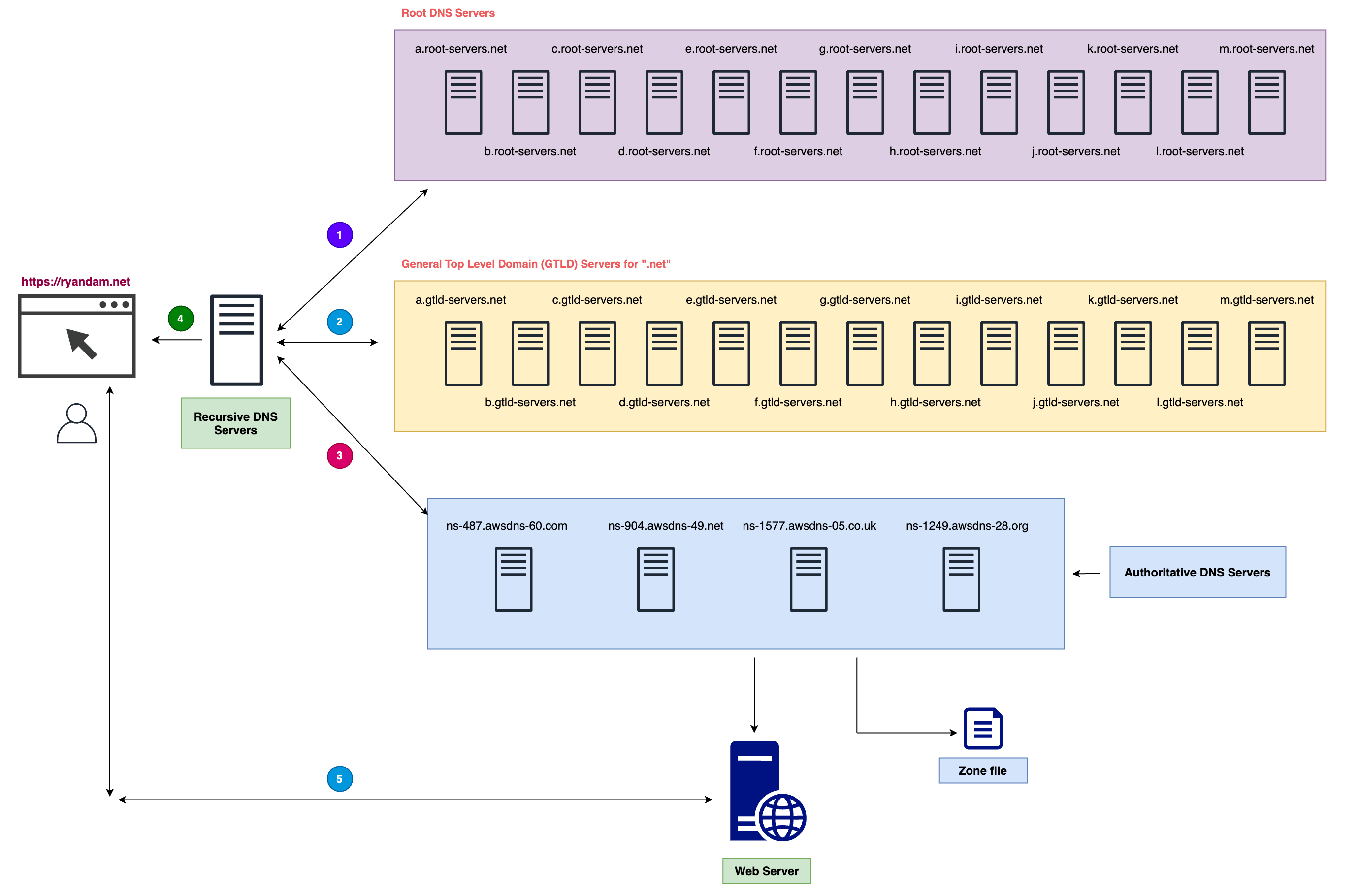
I hosted my static web site on S3 and used CloudFront to cache the site contents at multiple edge locations for faster downloading. A domain name ryandam.net is mapped to the CloudFront URL. A TLS certificate is also used which was created using AWS ACM service.
When I try to browse https://ryandam.net using a web browser, this is the series of steps performed:
- The domain name
ryandam.netis reallyryandam.net.The dot.at the end is the root domain. - My request for the domain goes to my ISP provider (by default). This behavior can be changed, for example, to use Google’s public DNS servers (
8.8.8.8or8.8.4.4). The ISP provider maintains one or more DNS servers called Recursive DNS Servers. They may or may not have cached the IP address of my site. If the IP address for the domain is cached, it will be returned to me. otherwise, the following steps are performed to get the IP address for the domain.
- The Recursive DNS server contacts the Root servers. There are
13root servers maintained by IANA. They don’t contain IP addresses of domains. but, they contain addresses of TLD servers (Top Level Domain). The top level domains are.net,.com,.org, etc.. Since in this case, I am looking forryandam.net, the TLD server addresses for.netwill be returned to the recursive DNS Server. - The Recursive DNS server now contacts the TLD serves for
.net. These servers are maintained by Verisign. They don’t have the IP address for the domain. However, they know where the zone file for the domain exists. When I created a hosted zone in Route 53, and configuredA,NS,SOArecord sets, the zone file is stored on multiple name servers. These are called Authoritative servers. The TLD servers return the addresses of the authoritative servers to the Recursive server. - The recursive DNS server talks to the Authoritative servers for the IP address. Since the IP address is stored in the zone file, it is returned. The DNS servers listen on port
53. - The IP address is then returned to my machine by the Recursive DNS Server.
- The browser then talk to the web server using the IP address.
Show DNS Root servers
➜ dig . ns
; <<>> DiG 9.16.1-Ubuntu <<>> . ns
;; global options: +cmd
;; Got answer:
;; ->>HEADER<<- opcode: QUERY, status: NOERROR, id: 20047
;; flags: qr rd ra; QUERY: 1, ANSWER: 13, AUTHORITY: 0, ADDITIONAL: 1

;; OPT PSEUDOSECTION:
; EDNS: version: 0, flags:; udp: 65494
;; QUESTION SECTION:
;.				IN	NS

;; ANSWER SECTION:
.			466634	IN	NS	h.root-servers.net.
.			466634	IN	NS	a.root-servers.net.
.			466634	IN	NS	i.root-servers.net.
.			466634	IN	NS	j.root-servers.net.
.			466634	IN	NS	k.root-servers.net.
.			466634	IN	NS	l.root-servers.net.
.			466634	IN	NS	m.root-servers.net.
.			466634	IN	NS	b.root-servers.net.
.			466634	IN	NS	c.root-servers.net.
.			466634	IN	NS	d.root-servers.net.
.			466634	IN	NS	e.root-servers.net.
.			466634	IN	NS	f.root-servers.net.
.			466634	IN	NS	g.root-servers.net.

;; Query time: 16 msec
;; SERVER: 127.0.0.53#53(127.0.0.53)
;; WHEN: Sat Jan 30 15:20:19 AEDT 2021
;; MSG SIZE  rcvd: 239
nslookup
nslookup is a program to query Internet domain name servers.
➜ nslookup ryandam.net
Server:		127.0.0.53
Address:	127.0.0.53#53

Non-authoritative answer:
Name:	ryandam.net
Address: 13.226.234.58
Name:	ryandam.net
Address: 13.226.234.41
Name:	ryandam.net
Address: 13.226.234.73
Name:	ryandam.net
Address: 13.226.234.33
lsof
List open files by a process.
# Find out the process id
ps -aef | grep httpd

# Identify the list of open files
lsof -p 7802
traceroute
traceroutetracks the route packets taken from an IP network on their way to a given host. It utilizes the IP protocol’s time to live (TTL) field and attempts to elicit an ICMP TIME_EXCEEDED response from each gateway along the path to the host.tracerouteutility uses the TTL field in the IP header to achieve its operation. Each time the packet is held on an intermediate router, it decreases the TTL value by 1. When a router finds the TTL value of 1 in a received packet then that packet is not forwarded but instead discarded.- After discarding the packet, router sends an ICMP error message of “Time exceeded” back to the source from where packet generated. The ICMP packet that is sent back contains the IP address of the router.
➜ traceroute ryandam.net
traceroute: Warning: ryandam.net has multiple addresses; using 13.226.234.41
traceroute to ryandam.net (13.226.234.41), 64 hops max, 52 byte packets
 1  mygateway (192.168.0.1)  4.695 ms  3.142 ms  3.150 ms
 2  n49-192-128-1.sun4.vic.optusnet.com.au (49.192.128.1)  12.487 ms  13.541 ms  12.625 ms
 3  * * *
 4  * * *
 5  bla2-hu0-5-0.ig.optusnet.com.au (211.29.126.234)  36.126 ms * *
 6  203.208.192.33 (203.208.192.33)  190.296 ms
    203.208.177.121 (203.208.177.121)  181.985 ms
    203.208.177.97 (203.208.177.97)  182.473 ms
 7  203.208.149.250 (203.208.149.250)  195.726 ms
    bla1-hu0-4-0.ig.optusnet.com.au (211.29.126.222)  25.499 ms
    bla2-hu0-4-0.ig.optusnet.com.au (211.29.126.230)  25.884 ms
 8  203.208.190.193 (203.208.190.193)  180.802 ms
    203.208.171.118 (203.208.171.118)  193.368 ms
    203.208.192.33 (203.208.192.33)  184.013 ms
 9  ae14.cs1.lax112.us.eth.zayo.com (64.125.27.40)  200.805 ms
    203.208.149.254 (203.208.149.254)  188.975 ms
    ae14.cs1.lax112.us.eth.zayo.com (64.125.27.40)  192.260 ms
10  203.208.149.254 (203.208.149.254)  190.677 ms
    ae14.cs1.lax112.us.eth.zayo.com (64.125.27.40)  197.973 ms
    203.208.149.250 (203.208.149.250)  198.576 ms
11  * * *
12  203.208.171.118 (203.208.171.118)  196.591 ms
    ae14.cs1.lax112.us.eth.zayo.com (64.125.27.40)  196.099 ms *
13  * * ae14.cs1.lax112.us.eth.zayo.com (64.125.27.40)  202.038 ms
14  * * *
15  * * *
16  * * *
17  * * *
18  * * *
19  * * *
20  * * *
21  * * *
22  * * *
23  * * *
24  * * *
25  * * *
26  * * *
27  * * *
28  * * server-13-226-234-41.lax50.r.cloudfront.net (13.226.234.41)  196.938 ms
route
Route manipulates the kernel’s IP routing tables. Its primary use is to set up static routes to specific hosts or networks via an interface after it has been configured with the ifconfig program.
➜ route
Kernel IP routing table
Destination     Gateway         Genmask         Flags Metric Ref    Use Iface
default         _gateway        0.0.0.0         UG    100    0        0 enp0s3
10.0.2.0        0.0.0.0         255.255.255.0   U     100    0        0 enp0s3
link-local      0.0.0.0         255.255.0.0     U     1000   0        0 enp0s3
ip
Show current network configuration
➜ ip a
1: lo: <LOOPBACK,UP,LOWER_UP> mtu 65536 qdisc noqueue state UNKNOWN group default qlen 1000
    link/loopback 00:00:00:00:00:00 brd 00:00:00:00:00:00
    inet 127.0.0.1/8 scope host lo
       valid_lft forever preferred_lft forever
    inet6 ::1/128 scope host
       valid_lft forever preferred_lft forever
2: enp0s3: <BROADCAST,MULTICAST,UP,LOWER_UP> mtu 1500 qdisc fq_codel state UP group default qlen 1000
    link/ether 01:00:26:aa:cc:ed brd ff:ff:ff:ff:ff:ff
    inet 10.0.2.15/24 brd 10.0.2.255 scope global dynamic noprefixroute enp0s3
       valid_lft 83627sec preferred_lft 83627sec
    inet6 fa80::1234:856:1223:1234/64 scope link noprefixroute
       valid_lft forever preferred_lft forever
lo- Loopback. This interface is still maintained for historical reasons.- IPv4 address of this instance is
10.0.2.15/24. Mac address is01:00:26:aa:cc:ed. IPv6 addressfa80::c176:856:1b4d:ed70/64 dynamictells that this address is assigned viaDHCPserver.valid_lft 83627sec- For this many seconds, the instance needs to check with DHCP server.
What if we delete the IP address assigned by the DHCP server?
➜ ip addr del dev enp0s3 10.0.2.15/24
now, if we use ip a
2: enp0s3: <BROADCAST,MULTICAST,UP,LOWER_UP> mtu 1500 qdisc fq_codel state UP group default qlen 1000
    link/ether 01:00:26:aa:cc:ed brd ff:ff:ff:ff:ff:ff
    inet6 fa80::c176:856:1b4d:ed70/64 scope link noprefixroute
       valid_lft forever preferred_lft forever
There is no IPv4 address assigned to the network interface.
How to assign a IPv4 address using DHCP
The Internet Systems Consortium DHCP Client, dhclient, provides a means for configuring one or more network interfaces using the Dynamic Host Configuration Protocol, BOOTP protocol, or if these protocols fail, by statically assigning an address.
➜ dhclient
2: enp0s3: <BROADCAST,MULTICAST,UP,LOWER_UP> mtu 1500 qdisc fq_codel state UP group default qlen 1000
    link/ether 01:00:26:aa:cc:ed brd ff:ff:ff:ff:ff:ff
    inet 10.0.2.15/24 brd 10.0.2.255 scope global dynamic enp0s3
       valid_lft 86347sec preferred_lft 86347sec
    inet6 fa80::1234:856:6789:asdc/64 scope link noprefixroute
       valid_lft forever preferred_lft forever
now an IPv4 address 10.0.2.15/24 is added to the network interface.
What if DHCP is not available?
In this case, we can assign a static IP.
➜ ip addr add dev enp0s3 10.0.2.15/24
IP Routes
➜ ip route show
default via 10.0.2.2 dev enp0s3 proto dhcp metric 100
10.0.2.0/24 dev enp0s3 proto kernel scope link src 10.0.2.15 metric 100
169.254.0.0/16 dev enp0s3 scope link metric 1000
The default route tells that the traffic leaves via gateway 10.0.2.2.
What if the default route is deleted?
➜ ip route del default via 10.0.2.2
After this, we are not able to reach the internet.
➜ ping google.com
ping: google.com: Temporary failure in name resolution
How to add the route back?
➜ ip route add default via 10.0.2.2
Show DNS resolver IP address
In most Unix-like operating systems and others that implement the BIND Domain Name System (DNS) resolver library, the resolv.conf configuration file contains information that determines the operational parameters of the DNS resolver. The DNS resolver allows applications running in the operating system to translate human-friendly domain names into the numeric IP addresses that are required for access to resources on the local area network or the Internet. The process of determining IP addresses from domain names is called resolving.
➜ cat /etc/resolv.conf
nameserver 127.0.0.53
options edns0 trust-ad
search home
127.0.0.53is the local DNS resolver.
If the file is not configured properly,
➜ ping google.com
ping: google.com: Temporary failure in name resolution
How to use Google’s Public DNS Servers
Google provides public DNS servers that acts as Recursive DNS server. That means, when a domain name has to be resolved, we will not use ISP’s recursive DNS server. We will use Google’s servers.
In order to use them, update the /etc/resolve.conf.
nameserver 8.8.8.8
nameserver 8.8.4.4
options edns0 trust-ad
search home
When we use ping now
➜ ping google.com
PING google.com (216.58.199.78) 56(84) bytes of data.
64 bytes from syd15s01-in-f78.1e100.net (216.58.199.78): icmp_seq=1 ttl=113 time=27.4 ms
64 bytes from syd15s01-in-f78.1e100.net (216.58.199.78): icmp_seq=2 ttl=113 time=28.9 ms
64 bytes from syd15s01-in-f78.1e100.net (216.58.199.78): icmp_seq=3 ttl=113 time=34.3 ms
64 bytes from syd15s01-in-f78.1e100.net (216.58.199.78): icmp_seq=4 ttl=113 time=27.6 ms
^C
--- google.com ping statistics ---
4 packets transmitted, 4 received, 0% packet loss, time 3003ms
rtt min/avg/max/mdev = 27.390/29.547/34.271/2.787 ms
However, when we use default resolver,
nameserver 127.0.0.53
options edns0 trust-ad
search home
PING google.com (142.250.67.14) 56(84) bytes of data.
64 bytes from syd15s16-in-f14.1e100.net (142.250.67.14): icmp_seq=1 ttl=114 time=27.4 ms
64 bytes from syd15s16-in-f14.1e100.net (142.250.67.14): icmp_seq=2 ttl=114 time=26.0 ms
64 bytes from syd15s16-in-f14.1e100.net (142.250.67.14): icmp_seq=3 ttl=114 time=31.8 ms
64 bytes from syd15s16-in-f14.1e100.net (142.250.67.14): icmp_seq=4 ttl=114 time=35.3 ms
^C
--- google.com ping statistics ---
4 packets transmitted, 4 received, 0% packet loss, time 3004ms
rtt min/avg/max/mdev = 26.026/30.123/35.292/3.667 ms
What’s the difference between Authoritative DNS NS Vs Recursive DNS NS?
- Authoritative DNS nameservers provide answers to recursive DNS servers about where the mapping between a domain name and IP address can be found. If we use AWS Route 53 to register our domain, by default it provides 4 Name servers. They all contain the hosted zone record sets. These are the Authoritative name servers.
- Recursive DNS servers perform the search and interaction with Root servers, Top Level Domain servers, and Authoritative name servers on behalf of us. They fetch the IP address from authoritative name servers and return to the client. Generally these are maintained by ISPs. They also cache the results.
/etc/hosts
- Contains a mapping of IP addresses to URLs.
➜ cat /etc/hosts
127.0.0.1	localhost
127.0.1.1	ryandam-machine

# The following lines are desirable for IPv6 capable hosts
::1     ip6-localhost ip6-loopback
fe00::0 ip6-localnet
ff00::0 ip6-mcastprefix
ff02::1 ip6-allnodes
ff02::2 ip6-allrouters
I added a fake entry to this file for google.com
➜ cat /etc/hosts
127.0.0.1	localhost
127.0.1.1	ryandam-machine
192.168.4.229   google.com
...
now when I try to ping google.com, the IP address used is the fake one set in the /etc/hosts file. Basically, this proves that we are able to override the default DNS server resolution.
➜ ping google.com
PING google.com (192.168.4.229) 56(84) bytes of data.
^C
--- google.com ping statistics ---
4 packets transmitted, 0 received, 100% packet loss, time 3057ms
There is a file /etc/nsswitch.conf that determines the order in which a command is resolved.
➜ cat /etc/nsswitch.conf
# /etc/nsswitch.conf
#
# Example configuration of GNU Name Service Switch functionality.
# If you have the `glibc-doc-reference' and `info' packages installed, try:
# `info libc "Name Service Switch"' for information about this file.

passwd:         files systemd
group:          files systemd
shadow:         files
gshadow:        files

hosts:          files mdns4_minimal [NOTFOUND=return] dns
networks:       files

protocols:      db files
services:       db files
ethers:         db files
rpc:            db files

netgroup:       nis
For example, for DNS host resolution, the order is first files, mdns4_minimal, and finally the dns system. Since files is referenced first, the local file /etc/hosts will be used to resolve hostnames.
arp
arp manipulates or displays the kernel’s IPv4 network neighbor cache. It can add entries to the table, delete one or display the current content. ARP stands for Address Resolution Protocol, which is used to find the media access control address of a network neighbor for a given IPv4 Address.
➜ arp -a
_gateway (10.0.2.2) at 52:54:00:12:35:02 [ether] on enp0s3
host
host is a simple utility for performing DNS lookups. It is normally used to convert names to IP addresses and vice versa. When no arguments or options are given, host prints a short summary of its command line arguments and options.
➜ host ryandam.net
ryandam.net has address 13.226.234.73
ryandam.net has address 13.226.234.58
ryandam.net has address 13.226.234.33
ryandam.net has address 13.226.234.41
➜ host 13.226.234.73
73.234.226.13.in-addr.arpa domain name pointer server-13-226-234-73.lax50.r.cloudfront.net.
whois
➜ whois ryandam.net
IPv4 Ranges
| Class A | 0.0.0.0 to 127.255.255.255 |
128 Networks (From 0 to 127). Default netmask /8. Each network with 2 power 24 IP addresses. |
| Class B | 128.0.0.0 to 191.255.255.255 |
Network - 128.0 to 191.255. Default netmask /16. Each network with 2 power 16 hosts. |
| Class C | 192.0.0.0 to 223.255.255.255 |
Network - 192.0.0 to 223.255.255. Default netmask /24. Each network with 254 hosts. |
| Class D | Used for Multicast | |
| Class E | Reserved |
Private IPv4 Address Space
10.0.0.0to10.255.255.255- 1 Class A network
172.16.0.0to172.31.255.255- 16 Class B networks
192.168.0.0to192.168.255.255- 255 Class C networks
Note that, for a given IP range for a network, if we use Default subnet mask /8 or /16 / 24, it is called Classful network. Otherwise it is called Classless network. For example, networks starting with 10.X.X.X are Class A networks. If we use 10.0.0.0/8 it is called Classful network as /8 is the default mask for Class A. However, if we use 10.0.0.0/16 where network is 10.16.0.0 it is called Classless network as we are using /16.
hostname
hostname is used to display the system’s DNS name, and to display or set its hostname or NIS domain name.
➜ hostname --help
Usage: hostname [-b] {hostname|-F file}         set host name (from file)
       hostname [-a|-A|-d|-f|-i|-I|-s|-y]       display formatted name
       hostname                                 display host name

       {yp,nis,}domainname {nisdomain|-F file}  set NIS domain name (from file)
       {yp,nis,}domainname                      display NIS domain name

       dnsdomainname                            display dns domain name

       hostname -V|--version|-h|--help          print info and exit

Program name:
       {yp,nis,}domainname=hostname -y
       dnsdomainname=hostname -d

Program options:
    -a, --alias            alias names
    -A, --all-fqdns        all long host names (FQDNs)
    -b, --boot             set default hostname if none available
    -d, --domain           DNS domain name
    -f, --fqdn, --long     long host name (FQDN)
    -F, --file             read host name or NIS domain name from given file
    -i, --ip-address       addresses for the host name
    -I, --all-ip-addresses all addresses for the host
    -s, --short            short host name
    -y, --yp, --nis        NIS/YP domain name

Description:
   This command can get or set the host name or the NIS domain name. You can
   also get the DNS domain or the FQDN (fully qualified domain name).
   Unless you are using bind or NIS for host lookups you can change the
   FQDN (Fully Qualified Domain Name) and the DNS domain name (which is
   part of the FQDN) in the /etc/hosts file.
Show hostname
➜ hostname
ryandam-machine
Show IP address assigned to the host
➜ hostname -I
10.0.2.15
How to change hostname
➜ cat /etc/hostname
ryandam-machine
hostnamectl
➜ hostnamectl --help
hostnamectl [OPTIONS...] COMMAND ...

Query or change system hostname.

Commands:
  status                 Show current hostname settings
  set-hostname NAME      Set system hostname
  set-icon-name NAME     Set icon name for host
  set-chassis NAME       Set chassis type for host
  set-deployment NAME    Set deployment environment for host
  set-location NAME      Set location for host

Options:
  -h --help              Show this help
     --version           Show package version
     --no-ask-password   Do not prompt for password
  -H --host=[USER@]HOST  Operate on remote host
  -M --machine=CONTAINER Operate on local container
     --transient         Only set transient hostname
     --static            Only set static hostname
     --pretty            Only set pretty hostname

See the hostnamectl(1) man page for details.
Show status
➜ hostnamectl status
   Static hostname: ryandam-machine
         Icon name: computer-vm
           Chassis: vm
        Machine ID: 14382877f0db4ec2880c121449a57c04
           Boot ID: 0157436b1a9749489afb21a6885dc9e3
    Virtualization: oracle
  Operating System: Ubuntu 20.04.1 LTS
            Kernel: Linux 5.8.0-40-generic
      Architecture: x86-64
➜ uname -a
Linux ryandam-machine 5.8.0-40-generic #45~20.04.1-Ubuntu SMP Fri Jan 15 11:35:04 UTC 2021 x86_64 x86_64 x86_64 GNU/Linux
nc
The nc (netcat) utility is used for just about anything under the sun involving TCP, UDP, or UNIX-domain sockets. It can open TCP connections, send UDP packets, listen on arbitrary TCP and UDP ports, do port scanning, and deal with both IPv4 and IPv6. Unlike telnet(1), nc scripts nicely, and separates error messages onto standard error instead of sending them to standard output, as telnet(1) does with some.
Common uses include:
- simple TCP proxies
- shell-script based HTTP clients and servers
- SOCKS or HTTP ProxyCommand for ssh(1)
➜ printf "GET / HTTP/1.0\r\n\r\n" | nc 3.133.155.46 80
HTTP/1.1 200 OK
Date: Sun, 07 Feb 2021 02:39:29 GMT
Server: Apache/2.4.46 ()
Upgrade: h2,h2c
Connection: Upgrade, close
Last-Modified: Sun, 07 Feb 2021 02:03:53 GMT
ETag: "3a-5bab57718fa85"
Accept-Ranges: bytes
Content-Length: 58
Content-Type: text/html; charset=UTF-8

<html><h1>Hello from Webserver: 172.31.13.122</h1></html>
Find default gateway of a network
➜ ip route show
default via 10.0.2.2 dev enp0s3 proto dhcp metric 100
...
➜ route -n
Kernel IP routing table
Destination     Gateway         Genmask         Flags Metric Ref    Use Iface
0.0.0.0         10.0.2.2        0.0.0.0         UG    100    0        0 enp0s3
...
iptables
iptables and ip6tables are used to set up, maintain, and inspect the tables of IPv4 and IPv6 packet filter rules in the Linux kernel. Several different tables may be defined. Each table contains a number of built-in chains and may also contain user-defined chains.
Each chain is a list of rules which can match a set of packets. Each rule specifies what to do with a packet that matches. This is called a `target’, which may be a jump to a user-defined chain in the same table.
TARGETS
A firewall rule specifies criteria for a packet and a target. If the packet does not match, the next rule in the chain is examined; if it does match, then the next rule is specified by the value of the target, which can be the name of a user-defined chain, one of the targets described in iptables-extensions(8), or one of the special values ACCEPT, DROP or RETURN.
- ACCEPT means to let the packet through.
- DROP means to drop the packet on the floor.
- RETURN means stop traversing this chain and resume at the next rule in the previous (calling) chain. If the end of a built-in chain is reached or a rule in a built-in chain with target RETURN is matched, the target specified by the chain policy determines the fate of the packet.
Block ICMP messages
This command adds an entry to the IP tables to drop all ICMP messages. I executed this command on an AWS EC2 Instance.
╭─
╰─○ iptables -A INPUT --proto icmp -j DROP
List IP tables
╭─
╰─○ iptables -L -n -v
Chain INPUT (policy ACCEPT 10 packets, 632 bytes)
 pkts bytes target     prot opt in     out     source               destination
    0     0 DROP       icmp --  *      *       0.0.0.0/0            0.0.0.0/0

Chain FORWARD (policy ACCEPT 0 packets, 0 bytes)
 pkts bytes target     prot opt in     out     source               destination

Chain OUTPUT (policy ACCEPT 6 packets, 696 bytes)
 pkts bytes target     prot opt in     out     source               destination
now, when I try to ping the instance from my local machine, all packets are lost.
╭─
╰─○ ping 3.133.155.46
PING 3.133.155.46 (3.133.155.46) 56(84) bytes of data.
^C
--- 3.133.155.46 ping statistics ---
21 packets transmitted, 0 received, 100% packet loss, time 20463ms
There is a way to see how the firewall rules are working. I executed the following command on the EC2 Instance.
╭─
╰─○ iptables -L INPUT -v
Chain INPUT (policy ACCEPT 59 packets, 4016 bytes)
 pkts bytes target     prot opt in     out     source               destination
   29  2308 DROP       icmp --  any    any     anywhere             anywhere
It shows that 29 packets have been dropped.
Deleting a rule
- First print the table.
╭─
╰─○ iptables -L --line-numbers
Chain INPUT (policy ACCEPT)
num  target     prot opt source               destination
1    DROP       icmp --  anywhere             anywhere

Chain FORWARD (policy ACCEPT)
num  target     prot opt source               destination

Chain OUTPUT (policy ACCEPT)
num  target     prot opt source               destination
- Delete the rule.
╭─
╰─○ iptables -D INPUT 1
ip
ip <object> <sub-command>
Objects
- Links
- Addresses
- Routes
- ARP table entries
Sub commands
- show
See link status
# See link status on all network devices
ip link show
1: lo: <LOOPBACK,UP,LOWER_UP> mtu 65536 qdisc noqueue state UNKNOWN mode DEFAULT group default qlen 1000
    link/loopback 00:00:00:00:00:00 brd 00:00:00:00:00:00
2: enp7s0:
3: wlp6s0:
Show network statistics
# -s - Statistics
# -h - human readable
ip -s -h link show dev wlp6s0
3: wlp6s0: <BROADCAST,MULTICAST,UP,LOWER_UP> mtu 1500 qdisc fq_codel state UP mode DORMANT group default qlen 1000
...
Show IP addresses of all interfaces
ip addr show
1: lo: <LOOPBACK,UP,LOWER_UP> mtu 65536 qdisc noqueue state UNKNOWN group default qlen 1000
    link/loopback 00:00:00:00:00:00 brd 00:00:00:00:00:00
    inet 127.0.0.1/8 scope host lo
       valid_lft forever preferred_lft forever
    inet6 ::1/128 scope host
       valid_lft forever preferred_lft forever
2: enp7s0: <NO-CARRIER,BROADCAST,MULTICAST,UP> mtu 1500 qdisc fq_codel state DOWN group default qlen 1000
3: wlp6s0: <BROADCAST,MULTICAST,UP,LOWER_UP> mtu 1500 qdisc fq_codel state UP group default qlen 1000
...
Show IP address of a single interface
ip addr show dev wlp6s0
Add a static IP to an interface
# This adds a secondary IP to an interface
ip addr change 192.168.0.3/24 dev wlp6s0
Displaying the route table
ip route show
default via 192.168.0.1 dev wlp6s0 proto dhcp metric 600
169.254.0.0/16 dev wlp6s0 scope link metric 1000
192.168.0.0/24 dev wlp6s0 proto kernel scope link src 192.168.0.2 metric 600
nmcli
- https://www.redhat.com/sysadmin/five-network-commands
- Network Manager CLI
nmcli <OBJECT> [COMMAND] [ARGUMENTS]
The most common objects are:
general- shows Network Manager status and permissionsnetworking- shows, enables, and disables networkingradio- shows, enables, and disables WiFi and WWANdevice- shows and manipulates the status of network devicesconnection- manages Network Manager connection profiles
➜ nmcli device status
DEVICE  TYPE      STATE        CONNECTION
wlp6s0  wifi      connected    xxxxxx
enp7s0  ethernet  unavailable  --
lo      loopback  unmanaged    --
➜ nmcli con show
NAME                UUID                                  TYPE      DEVICE
abc                 adsasdfadsf-asdfasdf-4e75-adsf-afasdf  wifi      wlp6s0
Wired connection 1  asdasfasdfasf-asdfasfdasdf  ethernet  --
➜ nmcli connection show abc
➜ nmcli -g ip4.address,ip4.dns connection show abc
192.168.0.2/24 | 192.168.0.3/24
192.168.0.1
nslookup
Name resolution
➜ nslookup redhat.com
Server:		127.0.0.53
Address:	127.0.0.53#53

Non-authoritative answer:
Name:	redhat.com
Address: 209.132.183.105
- Recursive DNS server is
127.0.0.53 - The response is non-authoritative as it is coming via a local NS.
Providing alternative name server
# Here I am using Google's NS as the DNS revolver.
➜ nslookup ryandam.net 8.8.8.8
Server:		8.8.8.8
Address:	8.8.8.8#53

Non-authoritative answer:
Name:	ryandam.net
Address: 13.225.149.26
Name:	ryandam.net
Address: 13.225.149.11
Name:	ryandam.net
Address: 13.225.149.48
Name:	ryandam.net
Address: 13.225.149.105
Reverse DNS queries
➜ nslookup 13.225.149.105
105.149.225.13.in-addr.arpa	name = server-13-225-149-105.lax3.r.cloudfront.net.

Authoritative answers can be found from:
How to find authoritative answers
Non-authoritative answer simply means the answer is not fetched from the authoritative DNS server for the queried domain name.
# Find the authoritative namer servers for ryandam.net
➜ dig ryandam.net NS +noall +answer
ryandam.net.		60	IN	NS	ns-1577.awsdns-05.co.uk.
ryandam.net.		60	IN	NS	ns-487.awsdns-60.com.
ryandam.net.		60	IN	NS	ns-904.awsdns-49.net.
ryandam.net.		60	IN	NS	ns-1249.awsdns-28.org.
➜ nslookup ryandam.net ns-1577.awsdns-05.co.uk.
Server:		ns-1577.awsdns-05.co.uk.
Address:	205.251.198.41#53

Name:	ryandam.net
Address: 13.225.149.48
Name:	ryandam.net
Address: 13.225.149.11
Name:	ryandam.net
Address: 13.225.149.26
Name:	ryandam.net
Address: 13.225.149.105
ss
- Socket Statistics
- Displays network socket information
- Replacement for netstat
# complete list of all established network sockets for socket types TCP, UDP, and UNIX.
➜ ss
# TCP Sockets & Listening
# Show Port numbers
# Also show Process related Info
➜ ss -tpln
State    Recv-Q   Send-Q      Local Address:Port       Peer Address:Port   Process
LISTEN   0        4096        127.0.0.53%lo:53              0.0.0.0:*       users:(("systemd-resolve",pid=649,fd=13))
LISTEN   0        128               0.0.0.0:22              0.0.0.0:*       users:(("sshd",pid=3068,fd=3))
LISTEN   0        5               127.0.0.1:631             0.0.0.0:*       users:(("cupsd",pid=691,fd=7))
LISTEN   0        128                  [::]:22                 [::]:*       users:(("sshd",pid=3068,fd=4))
LISTEN   0        5                   [::1]:631                [::]:*       users:(("cupsd",pid=691,fd=6))
tracepath
- Displays the network connectivity path between the local host and a remote host, identifying all routers used to route the traffic between them.
tracepathis a replacement fortraceroute, offering similar functionality. The main difference is thattracepathuses random UDP ports instead of the ICMP protocol for the trace, thus not requiring elevated privileges to run.- If
tracepathcannot connect to a network hop, it displays no reply. By default, the maximum number of hops it tries is 30, which is usually enough.
➜ tracepath ryandam.net
1?: [LOCALHOST]                      pmtu 1500
 1:  mygateway                                             4.362ms
 1:  mygateway                                             2.460ms
 2:  n122-104-80-1.sun4.vic.optusnet.com.au               14.821ms
 3:  no reply
 4:  no reply
 5:  bla1-hu0-5-0.ig.optusnet.com.au                      69.910ms asymm  7
 6:  203.208.177.125                                     179.372ms
 7:  203.208.149.250                                     184.016ms
 8:  203.208.171.118                                     181.090ms
 9:  203.208.171.118                                     179.699ms asymm  8
10:  203.208.171.118                                     242.759ms asymm  8
11:  ae13.cs2.lax112.us.eth.zayo.com                     190.252ms asymm 12
12:  203.208.171.118                                     375.469ms asymm  8
13:  ???                                                 187.695ms asymm 12
14:  ???                                                 188.321ms asymm 12
15:  150.222.252.79                                      184.743ms asymm 25
16:  no reply
17:  150.222.234.45                                      186.907ms asymm 15
18:  no reply
19:  no reply
20:  no reply
21:  150.222.101.114                                     376.381ms asymm 23
22:  150.222.101.28                                      188.526ms asymm 23
23:  150.222.101.78                                      372.193ms
24:  150.222.101.66                                      402.781ms asymm 23
25:  150.222.101.48                                      375.547ms asymm 23
26:  no reply
27:  no reply
28:  no reply
29:  no reply
30:  no reply
     Too many hops: pmtu 1500
     Resume: pmtu 1500
➜ tracepath 192.168.0.20
 1?: [LOCALHOST]                      pmtu 1500
 1:  192.168.0.20                                          7.408ms reached
 1:  192.168.0.20                                          5.816ms reached
     Resume: pmtu 1500 hops 1 back 1